Introducing Crooli Lens
Crooli Lens turns public articles into calm, focused reading views that are easier to read, listen to, save, and share.
 Crooli NewsroomCompany news and product updates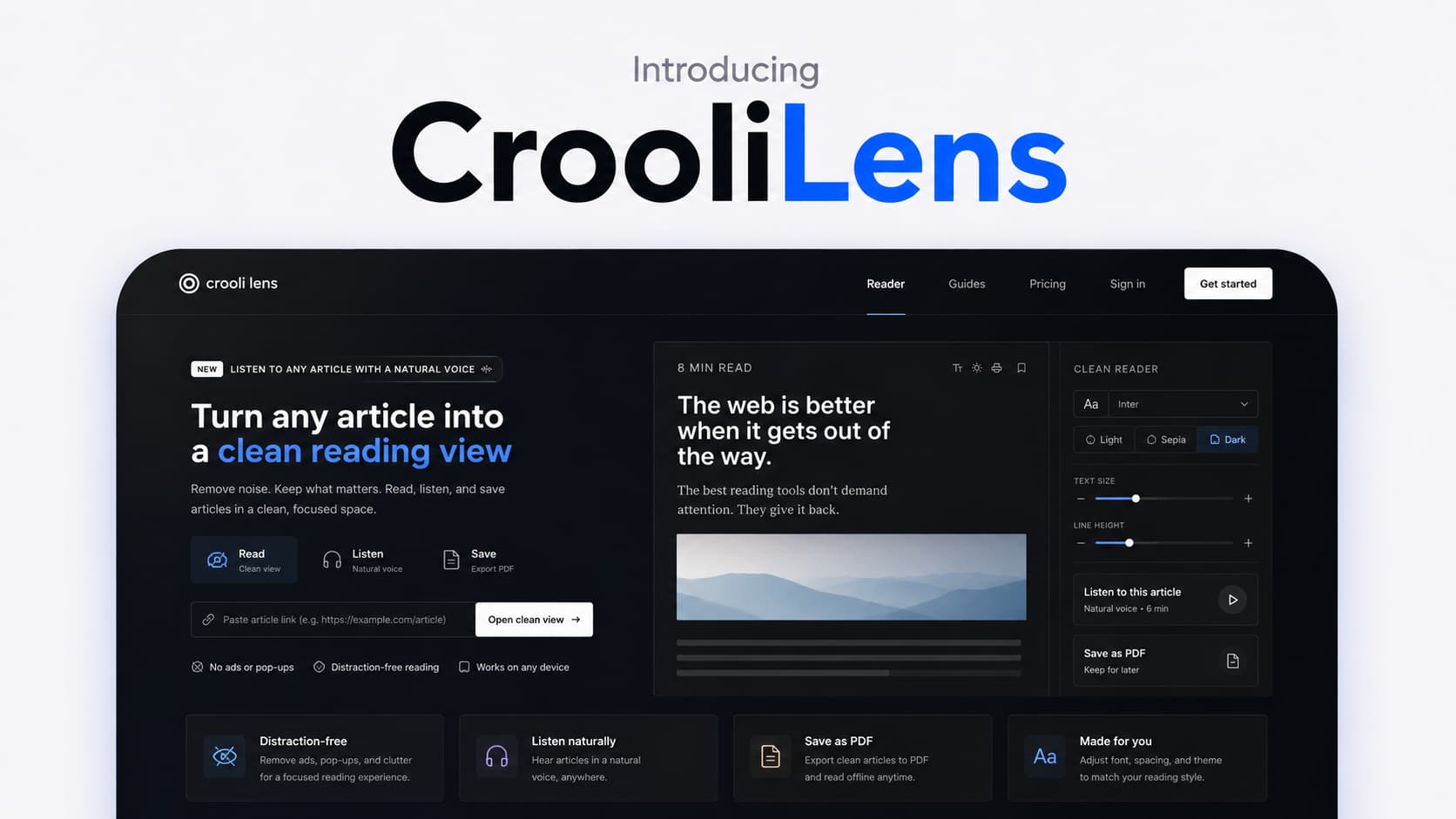
A calmer way to read anything on the web.
Online articles are often surrounded by everything except the article itself. Adverts, pop-ups, cookie banners, navigation, recommendations, and unrelated links all compete with the words you opened the page to read.
Crooli Lens was built to clear that space.
Paste the URL of a public news story, essay, guide, or blog post and Lens turns it into a clean reading view containing the article title, author, words, images, and useful links.
Just the article
Lens removes the page elements that make focused reading harder while keeping the content that matters.
The result is a simple reading view designed to work whether you are settling into a long essay or quickly catching up on a news story. Reading time and a table of contents help you understand the shape of an article, while clear typography gives the words room to breathe.
There is no new workflow to learn:
- Copy the link to an article
- Paste it into Crooli Lens
- Read, listen, or save the clean version
Direct links work too. Add a complete article URL after `lens.crooli.com/` to open it in the reader.
Make every article comfortable to read
A reading view should adapt to the reader, not ask the reader to adapt to it.
Lens includes controls for text size, typeface, and colour theme. Readers can choose from Serif, Inter, Lora, and Atkinson, including the accessibility-focused Atkinson Hyperlegible typeface with its distinct letterforms.
Light and paper-style themes are available alongside a dark reading mode. Font, text size, and theme choices are saved in the browser so the next article opens the way you prefer it.
The experience is responsive across desktop and mobile, making the same focused reader useful at a desk or on the move.
Listen with a natural voice
Sometimes the best way to keep up with an article is to listen.
Crooli Lens can turn a clean article into natural-sounding audio without requiring an account or API key. Narration is generated on the reader's device, and the voice model is cached by the browser after its first download.
Playback controls make it possible to pause, resume, change speed, or close the player while following the text.
This turns an article into something you can continue with while walking, travelling, or taking a break from the screen.
Save a clean PDF
Lens also makes it easy to keep an article for later.
The PDF option applies a dedicated print layout, removes the reader controls, and preserves useful links. The resulting document is easier to archive, annotate, send, or read offline than a printout of the original page.
It is the same principle behind the rest of Lens: keep the article and remove what gets in its way.
Designed for public articles
Crooli Lens works with most public articles, essays, news stories, and blog posts.
Pages that require a login or sit behind a hard paywall may not be available. Lens is a reading tool for accessible web content, not a way around the access choices made by publishers.
A focused product from Crooli
Lens reflects the kind of software we want to make at Crooli: direct, useful, and respectful of people's attention.
It does not try to turn reading into another feed or demand that you build a new library before it becomes useful. Give it a link and it gives the article room to be read.
Crooli Lens is live now.
Visit lens.crooli.com and open your next article in a cleaner view.